
All staff of any member organization, in any country, can access the OneJA Platform and the People Directory. To appear in the directory, a person first needs to join the platform. There are two ways to do this: by invitation from a local manager, or by self-registration using a JAID account.
Follow whichever method fits your situation below.
Method 1: Add a Colleague by Invitation
A local manager can add members to the OneJA Platform by entering the new member’s name, email, and title.
⚠️ Important: The email must be an organizational email address. Personal addresses (such as Gmail or Hotmail) will cause the registration to be rejected.
Steps
- Go to portal.oneja.org/ja-member/.
- Search for your organization’s name (listed as the Member).
- Check who your local account manager is, and ask them to invite the new member.
- If you are the local manager, open the left sidebar and select the option to add members.
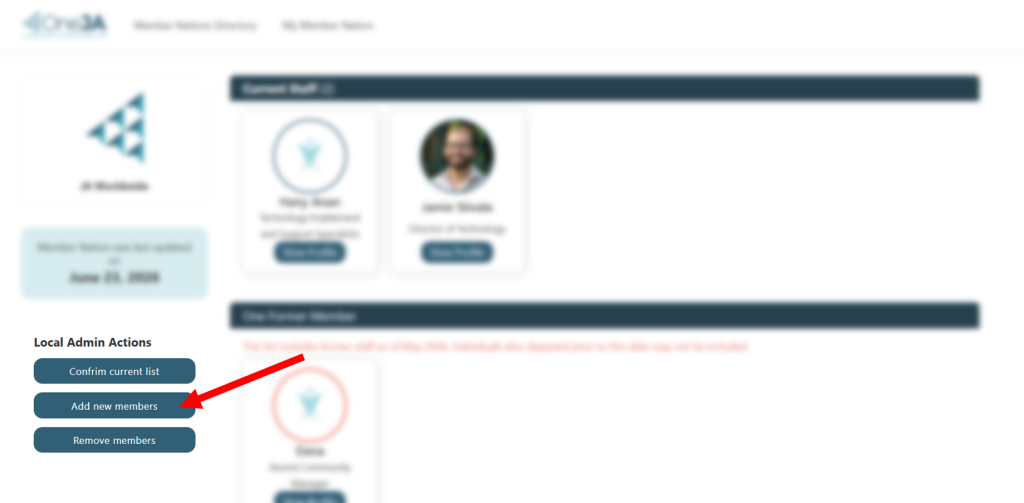
Once you complete this action, the invited member automatically receives an email. The email asks them to either:
- Create an account using JAID, or
- Log in with JAID if they already have an account.
After the member completes registration, their profile will appear in the People Directory.
Method 2: Join by Self-Registration (via JAID)
If you have not been invited, you can join on your own using a JAID account. This works whether you already have a JAID account or need to create a new one.
Steps
- Go to portal.oneja.org/login.
- Click the Self-Registration button.
- Select your region, then your country.
- Fill in the required information to continue and set up your profile.
Once registration is complete, you’ll have access to your OneJA profile and the People Directory.
Still Having Trouble?
If you run into any issues with either method, submit a support ticket by emailing support@jaworldwide.org.